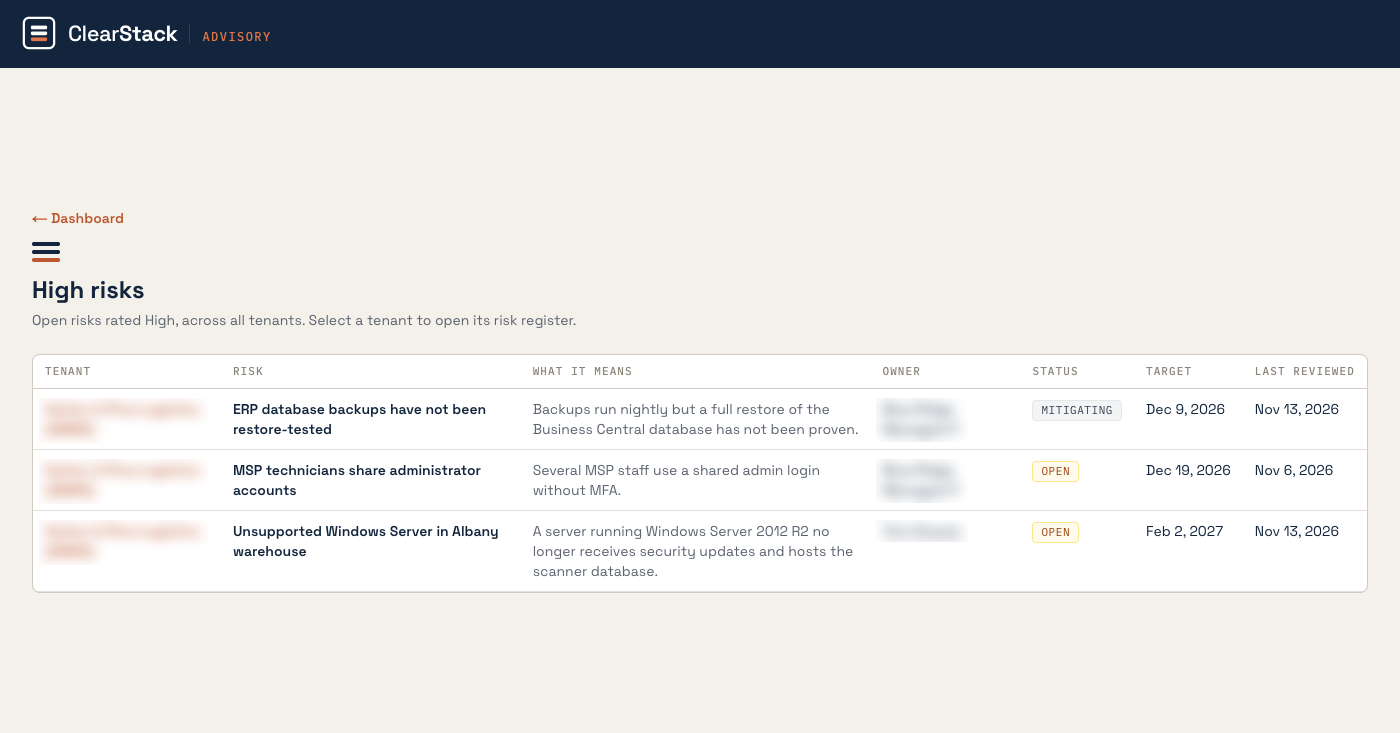
The screenshot with this post comes from the ClearStack client portal. It shows the High Risks view: every open risk rated High, across a client's environment, in one list, with an owner, a target date, and a last reviewed date on each item. The tenant and owner names are fogged. The risk types shown are the types that surface in almost every environment I review.
Your MSP sends a monthly report, and most of those reports show green across the board. The structure explains why. The MSP performs the work and also reports on the work, so the report reflects what the MSP measured about itself. ClearStack sits on the client side of that relationship. My role is to check the critical areas of the infrastructure independently, record what the evidence shows, and keep each item visible until it closes. That is the accountability piece of a fractional CIO engagement, and the portal is where the client watches it happen.
The five areas I check on a standing cycle
- Patch management: which devices and servers are current, which are behind, and which are excluded from the report.
- Endpoint protection: which devices carry working protection, and which devices in the inventory carry none.
- Backup and recovery: whether backup jobs run, and whether a restore has been tested with a recorded result.
- Data protection and access: who holds administrator access, whether those accounts are shared, and whether MFA covers them.
- Business continuity: whether the company can operate when a system, a site, or a key vendor fails, and when that was last walked through.
Each area gets evidence, not a verbal assurance. I request a standard pack from the MSP or the internal IT team: the asset inventory with operating system versions, the patch compliance report, the endpoint coverage report, backup results for the last 30 days, the last test restore record, and the privileged account list. Client systems add their own reports, such as MFA coverage and admin role assignments from Microsoft 365.
Three risks in the screenshot, and how each one surfaces
ERP database backups have not been restore tested. The backup report shows nightly jobs completing. I ask for the last test restore, with a date and a result. In this type of case there is a backup log and no restore record, and nobody at the company can name a date. A completed backup job is a claim. A tested restore is proof, and the portal records the difference.
MSP technicians share administrator accounts. The privileged account list shows a shared admin login in use by several technicians, without MFA. Shared accounts remove individual accountability, because the logs show the account and never the person. This surfaces during the access review, when I ask for every admin account, who uses it, and how the password is stored.
An unsupported Windows Server is still in production. The asset inventory lists a server running Windows Server 2012 R2, an operating system that stopped receiving security updates in October 2023, at a warehouse location, hosting the database the warehouse scanners depend on. One inventory line produces this finding, once somebody reads the inventory with end of support dates in mind.
How the portal keeps these items from falling through the cracks
Each risk in the portal carries a plain language explanation under "What it means," a named owner, a status, a target date, and a last reviewed date. Each risk also carries three fields that do the accountability work. Source records how ClearStack learned of the item, such as the MSP data pack, a client system report, or an interview. Evidence links to the report or log behind the item, with its date. Confidence records the state of the checking: Reported, Documented, or Verified.
A status the MSP reports stays marked as reported until I verify it against a second source. When a verification produces a commitment, the commitment becomes an action item with a named owner and a due date. Evidence that was requested and has not arrived shows as awaiting evidence, then overdue, and the MSP scorecard for that period stays incomplete until it resolves. The client executive team sees the same record I see, in the same portal, at any time.
A note on how I work with MSPs
This process helps a good MSP. A good MSP has the reports, answers the evidence requests, and closes items on the dates it commits to, and the portal gives that MSP a clean record of work the client can see. My questions are the standard reporting a client should require from the firm that runs its systems. The client gains a verified picture of its own environment, and decisions about risk acceptance, spending, and timing get made from that picture, with names and dates attached.
Not sure where your IT really stands? Start with a Clarity Audit: a focused assessment of your backups, security, vendors, and AI readiness. It's the first step in every engagement I take on.
About the author: Chris McGlasson is a fractional CIO and the founder of ClearStack Advisory, where he helps mid-market companies build AI governance, IT strategy, and technology roadmaps without the overhead of a full-time CIO. He founded, scaled, and successfully exited LANPRO Systems, a MSP supporting a substantial client base across California, the United States, and international markets.